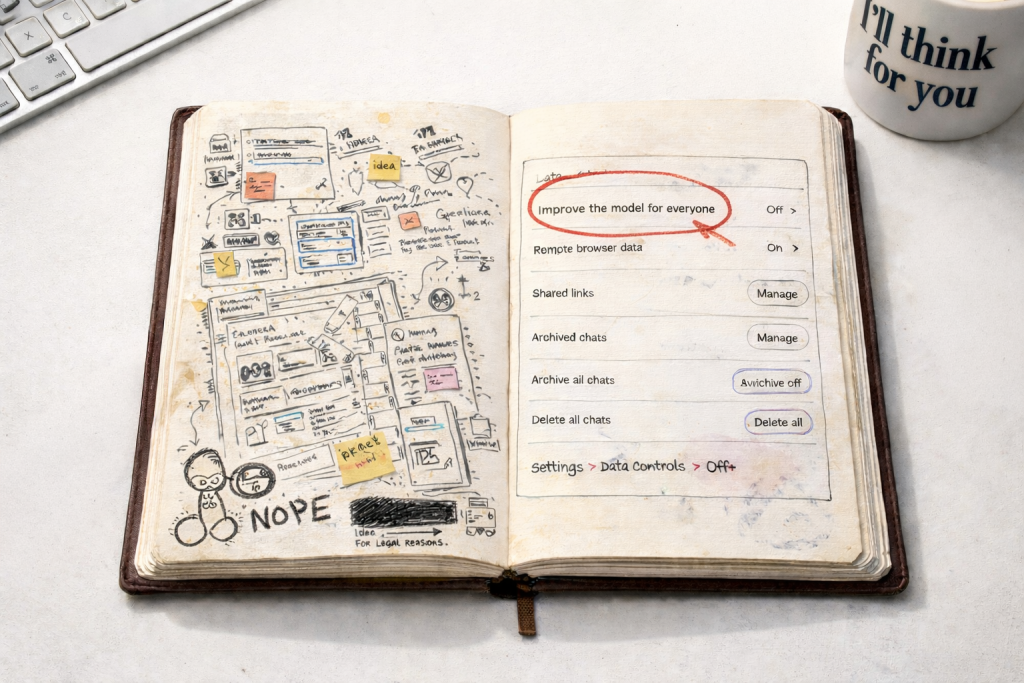

I use ChatGPT the same way I use a sketchbook.
Not for finished work.
Not for polished thinking.
And definitely not for anything I’d want taken out of context.
It’s where the messy thinking lives. Rough ideas. Half-finished thoughts. The sort of thinking you wouldn’t read out in a meeting, but absolutely need to get somewhere useful. Like any creative tool, its value is in what happens before the outcome.
As a graphic designer, I’ve started using ChatGPT much earlier in my creative process. Not to replace thinking, but to support it. To test language. To explore ideas. To think out loud. That makes it incredibly useful, but it also raises sensible questions around privacy and how AI tools handle work-in-progress ideas.
Recently, while attending an Implementing AI training course, I was given a small but important nugget of privacy wisdom by one of the AI professionals leading the session. It’s the sort of thing that’s easy to miss, but worth knowing if you’re using ChatGPT regularly, especially for creative work or client-facing projects.
Check your ChatGPT data controls.
Inside ChatGPT’s settings, there’s an option called “Improve the model for everyone.” When this is enabled, your conversations may be used to help train and improve the system.
That might be absolutely fine for some people. But if, like me, you use ChatGPT as part of your design thinking process, to explore early concepts, draft copy, or work through client challenges, you might prefer to keep that material private.
The important thing is that you have a choice.
Turning it off takes less time than making a cup of tea:
Settings → Data Controls → “Improve the model for everyone” → Off
You can also go directly to the ChatGPT data controls page here: https://chatgpt.com/#settings/DataControls
Switching this setting off doesn’t affect how you use ChatGPT day to day. It simply means your new conversations won’t be used to improve the model.